

वर्डप्रेस परिवेश के लिए, स्थानीय एसईओ के लिए यूआरएल संरचनाओं पर नियंत्रण बनाए रखना महत्वपूर्ण है। MultiLipi वर्डप्रेस प्लगइन में एक समर्पित यूआरएल स्लग मैनेजर जो आपको अपने स्रोत पाथ के बीच स्पष्ट मैपिंग नियम परिभाषित करने की अनुमति देता है (जैसे, /हमारे-बारे-में/) और उनके स्थानीयकृत लक्ष्य (जैसे, /अनुवववववुत-नवीन/)। यह सुनिश्चित करता है कि अनुरोध आपके सर्वर को छोड़ने से पहले आपके विशिष्ट कीवर्ड यूआरएल संरचना में संरक्षित रहें।
यह गाइड इन रूटिंग मैप्स को परिभाषित करने के लिए प्रोटोकॉल का विवरण देती है।
1. मैपिंग आर्किटेक्चर
प्लगइन रूटिंग को कैसे संभालता है।
प्लगइन एक interceptor। जब आपके वर्डप्रेस साइट पर इस मैनेजर में परिभाषित अनुवादित पाथ के लिए कोई अनुरोध आता है, तो प्लगइन मैपिंग की पहचान करता है और 404 त्रुटि उत्पन्न किए बिना सही अंतर्निहित सामग्री प्रस्तुत करता है। यह आपको मूल-भाषा स्लग के साथ अंग्रेजी यूआरएल को "मास्क" करने की अनुमति देता है।
2. कॉन्फ़िगरेशन प्रोटोकॉल
इन नियमों को सीधे अपने वर्डप्रेस एडमिन पैनल से प्रबंधित करें।
चरण 1: WP एडमिन संदर्भ तक पहुंचें
अपने वर्डप्रेस डैशबोर्ड में लॉग इन करें (/wp-admin).
सुनिश्चित करें कि मल्टीलिपि प्लगइन इंस्टॉल और सक्रिय है।
चरण 2: स्लग मैनेजर को इनिशियलाइज़ करें
मुख्य वर्डप्रेस साइडबार में, इसे देखें और क्लिक करें MultiLipi.
सब-मेनू से, चुनें यूआरएल स्लग.
संदर्भ: यह मल्टीलिपि यूआरएल स्लग मैनेजर स्क्रीन खोलता है, जो सभी सक्रिय स्थानीय मैप्स प्रदर्शित करता है।
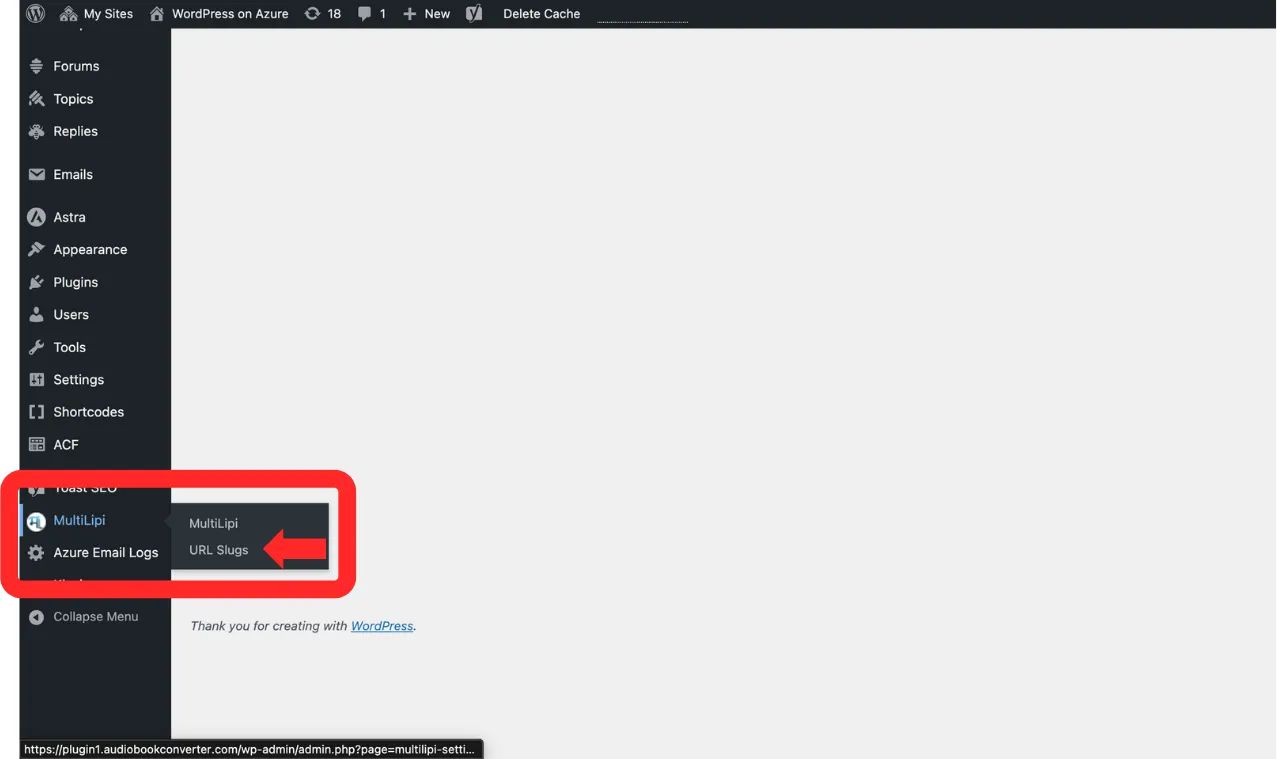
नेविगेट करें MultiLipi → URL Slugs वर्डप्रेस साइडबार से
चरण 3: नया नियम परिभाषित करें
पर क्लिक करें "+ नए स्लग जोड़ें" बटन।
एक नई इनपुट पंक्ति दिखाई देगी। स्कीमा को इस प्रकार भरें:
भाषा: लक्ष्य लोकेल कोड चुनें (जैसे, नमस्ते — हिंदी).
मूल पथ: मौजूदा स्रोत यूआरएल डालें (उदाहरण के लिए, /sample-page/). ध्यान दें: यह पृष्ठ पहले से मौजूद होना चाहिए।
अनुवादित पाथ: अपना वांछित कस्टम स्लग डालें (उदाहरण के लिए, /अनुवववववुत-नवीन/).
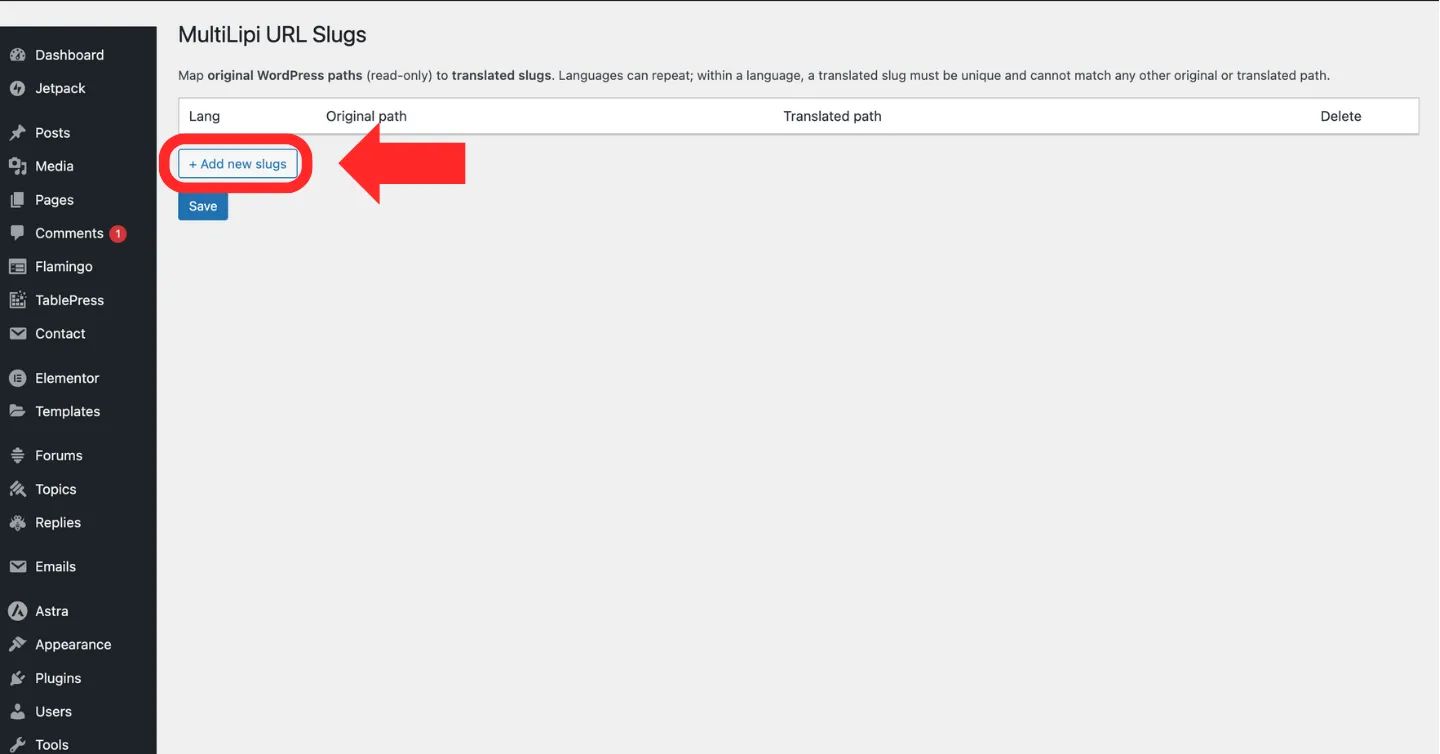
पर क्लिक करें "+ नए स्लग जोड़ें" नया यूआरएल मैपिंग नियम बनाने के लिए बटन
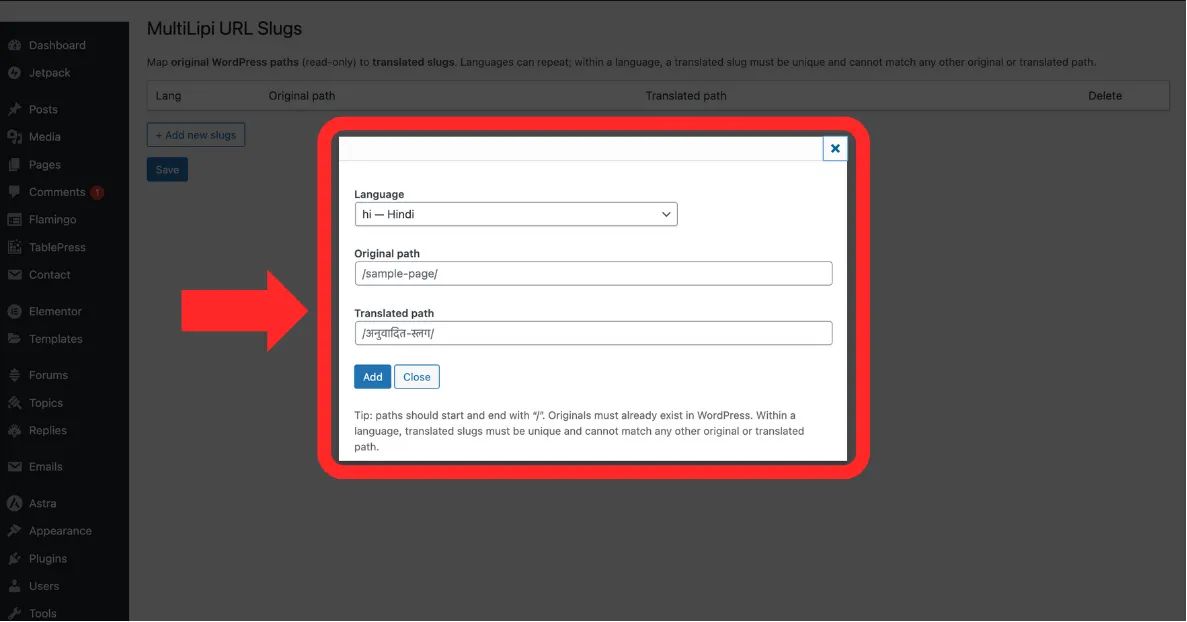
भरें भाषा, मूल पाथ, आप स्केल और सटीकता दोनों हासिल कर सकते हैं। अनुवादित पाथ फ़ील्ड
चरण 4: मैपिंग कमिट करें
क्लिक करें Save नियम लागू करने के लिए।
सिस्टम क्रिया: रूटिंग मैप तुरंत अपडेट हो जाता है। हिंदी में ब्राउज़ करने वाले उपयोगकर्ता जो अनुवादित पाथ पर जाते हैं, वे अब सही सामग्री देखेंगे।
3. सत्यापन और बाधाएं
मान्य पाथ के लिए नियम इंजीनियरिंग।
रूटिंग त्रुटियों या अनंत लूप को रोकने के लिए, सिस्टम निम्नलिखित सख्त बाधाओं को लागू करता है:
स्लैश संगति
हर पाथ (मूल और अनुवादित) स्लैश से शुरू और खत्म होना चाहिए /.
सही: /हमारे-बारे-में/
गलत: about-us
विशिष्टता
The अनुवादित पाथ उस विशिष्ट भाषा के भीतर अद्वितीय होना चाहिए। आप दो अलग-अलग पृष्ठों को एक ही स्लग पर मैप नहीं कर सकते।
अस्तित्व की जाँच
आप "घोस्ट यूआरएल" को मैप नहीं कर सकते। मूल पाथ आपके वर्डप्रेस साइट पर एक मान्य, प्रकाशित पृष्ठ का संदर्भ देना चाहिए।