

1. GEO लाभ (उप-निर्देशिकाएँ क्यों?)
एआई युग के लिए अनुकूलन।
कीवर्ड पर केंद्रित पारंपरिक एसईओ। जेनरेटिव इंजन ऑप्टिमाइज़ेशन (GEO) एक मौलिक बदलाव का प्रतिनिधित्व करता है—"एंटिटी अथॉरिटी" और सिमेंटिक समझ पर ध्यान केंद्रित करता है। ChatGPT, Gemini, और Perplexity जैसे AI मॉडल यह मूल्यांकन करते हैं कि आपका ब्रांड एक सुसंगत, आधिकारिक इकाई है या नहीं। सब-डायरेक्टरी सभी बहुभाषी सामग्री को एक डोमेन के तहत समेकित करती हैं, जिससे AI-जनित उत्तरों में उद्धरण की संभावना नाटकीय रूप से बढ़ जाती है।
साइटेशन अथॉरिटी
उपयोग करना site.com/fr/ के बजाय fr.site.com AI मॉडल को संकेत देता है कि आपकी सामग्री आपके मुख्य ब्रांड इकाई का एक अभिन्न अंग है। यह एकीकृत संरचना सभी भाषा बाज़ारों में उद्धरण की संभावना को काफ़ी बढ़ा देती है।
ज्ञान ग्राफ़ समेकन
सभी ट्रैफ़िक, बैकलिंक्स और जुड़ाव संकेत एक में फ़ीड होते हैं एकल डोमेन प्राधिकरण स्कोर। site.com/es/ के लिए प्रत्येक बैकलिंक आपके पूरे डोमेन को मजबूत करता है—जिसमें site.com/fr/ और site.com शामिल हैं—एक एकीकृत प्राधिकरण प्रोफ़ाइल बनाता है जिसे AI मॉडल भरोसेमंद मानते हैं।
2. परिनियोजन पूर्वापेक्षाएँ
वर्चुअल उप-निर्देशिका रूटिंग के लिए आवश्यकताएँ।
सक्षम करने के लिए वर्चुअल सब-डायरेक्टरी रूटिंग बिना आपके सर्वर पर भौतिक फ़ोल्डर बनाए, आपके वातावरण को इन बाधाओं को पूरा करना चाहिए:
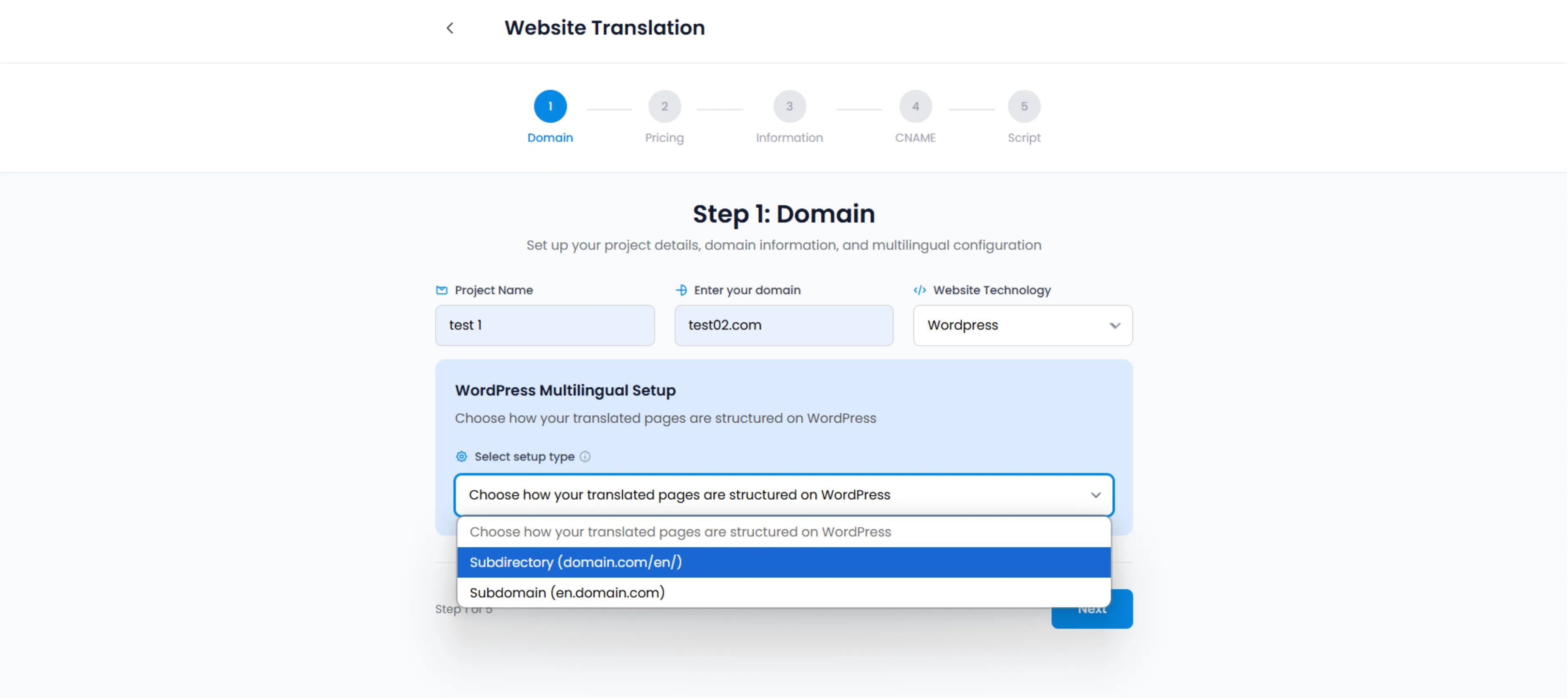
चयन करें उप-निर्देशिका (domain.com/en/) समेकित एसईओ प्राधिकरण को सक्षम करने के लिए प्रोजेक्ट सेटअप के दौरान
पर्मालिंक कॉन्फ़िगरेशन
आपके वर्डप्रेस पर्मालिंक्स को कुछ भी सेट किया जाना चाहिए "सादा" के अलावा। (उदाहरण के लिए, "पोस्ट नाम" की सिफारिश की जाती है)।
पथ: सेटिंग्स → पर्मालिंक्स
सर्वर रीराइट्स
आपके सर्वर को समर्थन देना चाहिए यूआरएल रीराइटिंग.
Apache:
आवश्यकताएँ .htaccess समर्थन (99% WP होस्ट पर स्टैंडर्ड)।
Nginx / LiteSpeed:
आमतौर पर डिफ़ॉल्ट रूप से काम करता है।
मल्टीलिपि प्लगइन
आधिकारिक प्लगइन एक ट्रैफिक कंट्रोलर, अनुरोधों को इंटरसेप्ट कर रहा है /fr/ और अनुवादित पेलोड को गतिशील रूप से परोसना।
3. रूटिंग इंजन कैसे काम करता है
किसी भौतिक फ़ोल्डर की आवश्यकता नहीं है।
जब कोई उपयोगकर्ता अनुरोध करता है yoursite.com/fr/about, MultiLipi करता है नहीं नामक एक फ़ोल्डर देखें fr आपके सर्वर पर।
1. इंटरसेप्शन
MultiLipi प्लगइन 404 अनुरोध को इंटरसेप्ट करता है जो सामान्य रूप से होता।
2. इंजेक्शन
यह "हमारे बारे में" पृष्ठ के फ्रेंच संस्करण के लिए हमारे API से पूछताछ करता है।
3. वितरण
यह URL संरचना को बनाए रखते हुए अनुवादित HTML को गतिशील रूप से प्रस्तुत करता है।
4. मेटाडेटा सिंक
यह स्वचालित रूप से सही hreflang टैग इंजेक्ट करता है, पेज को एक स्थानीयकृत विकल्प के रूप में पहचानता है।
4. समस्या निवारण प्रोटोकॉल (404 त्रुटियाँ)
सामान्य पर्मालिंक समस्याओं को ठीक करें।
यदि आप सब-डायरेक्टरी सक्षम करते हैं और आपके अनुवादित पृष्ठ वापस आते हैं 404 नहीं मिला त्रुटि, यह लगभग हमेशा एक "पर्मलिंक्स फ्लश" समस्या।
फिक्स प्रोटोकॉल:
1. एडमिन एक्सेस करें
अपने वर्डप्रेस डैशबोर्ड पर जाएं।
2. नेविगेट करें
सेटिंग्स → पर्मालिंक्स पर जाएं।
3. नियमों को फ्लश करें
पुनर्लेखन नियमों को फिर से उत्पन्न करने के लिए "परिवर्तन सहेजें" पर क्लिक करें।
4. कैश साफ़ करें
WP रॉकेट या W3 टोटल कैश का उपयोग करते समय सभी कैश साफ़ करें।
सफलता संकेतक:
इन चरणों को पूरा करने के बाद, आपके सब-डायरेक्टरी यूआरएल (उदाहरण के लिए, /fr/) 404 त्रुटियों के बिना ठीक से लोड होना चाहिए।