

एंटरप्राइज़ स्थानीयकरण के लिए अक्सर ऑफ़लाइन वर्कफ़्लो की आवश्यकता होती है। चाहे आपको समीक्षा के लिए 5,000 स्ट्रिंग्स की कानूनी टीम को भेजने की आवश्यकता हो या किसी अन्य सिस्टम से पुरानी अनुवाद मेमोरी माइग्रेट करने की, MultiLipi आपके भाषाई डेटा तक पूर्ण रीड/राइट एक्सेस प्रदान करता है।
यह गाइड आयात प्रोटोकॉल के लिए प्रोटोकॉल को कवर करती है बाहरी डेटा लेना (आयात) और अनुवाद मेमोरी निकालना (निर्यात).
डेटा लेना (आयात प्रोटोकॉल)
इसके लिए सर्वश्रेष्ठ: थोक अद्यतन, अन्य प्लेटफार्मों से माइग्रेट करना, या बैकअप पुनर्स्थापित करना।
आप एक संरचित फ़ाइल अपलोड करके अपने लाइव अनुवाद अनुक्रमणिका को अधिलेखित या अद्यतन कर सकते हैं।
चरण 1: भाषाई परत तक पहुँचें
- अपने MultiLipi डैशबोर्ड पर नेविगेट करें।
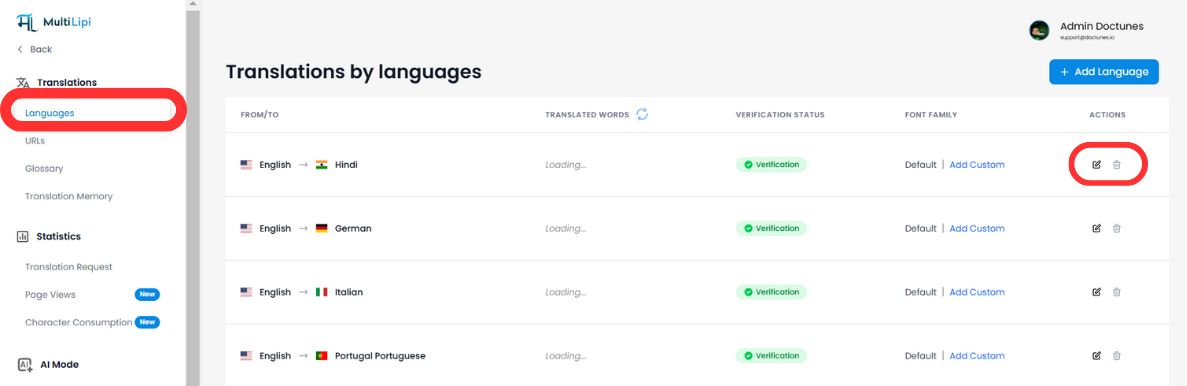
- चयन करें अनुवाद > भाषाएँ साइडबार से।
- उस विशिष्ट भाषा जोड़ी का पता लगाएं जिसे आप अपडेट करना चाहते हैं (उदाहरण के लिए, अंग्रेजी → हिन्दी).
- पर क्लिक करें संपादित करें आइकन उस स्थान के लिए अनुवाद मेमोरी खोलने के लिए (पेंसिल) पर क्लिक करें।
चरण 2: इनगेशन शुरू करें
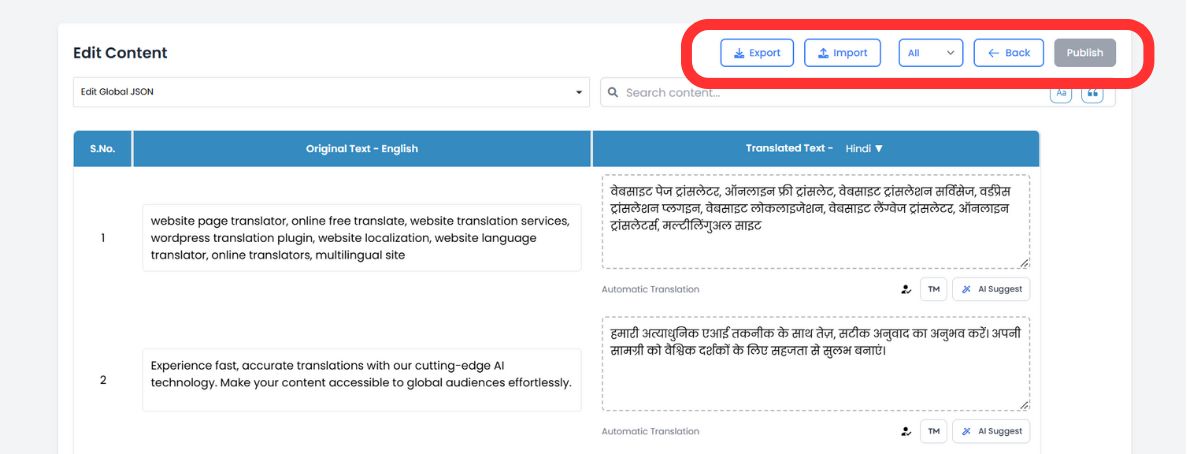
संपादक के शीर्ष टूलबार में, संपादित करें पर क्लिक करें आयात आइकन.
चरण 3: अपलोड और कॉन्फ़िगर करें
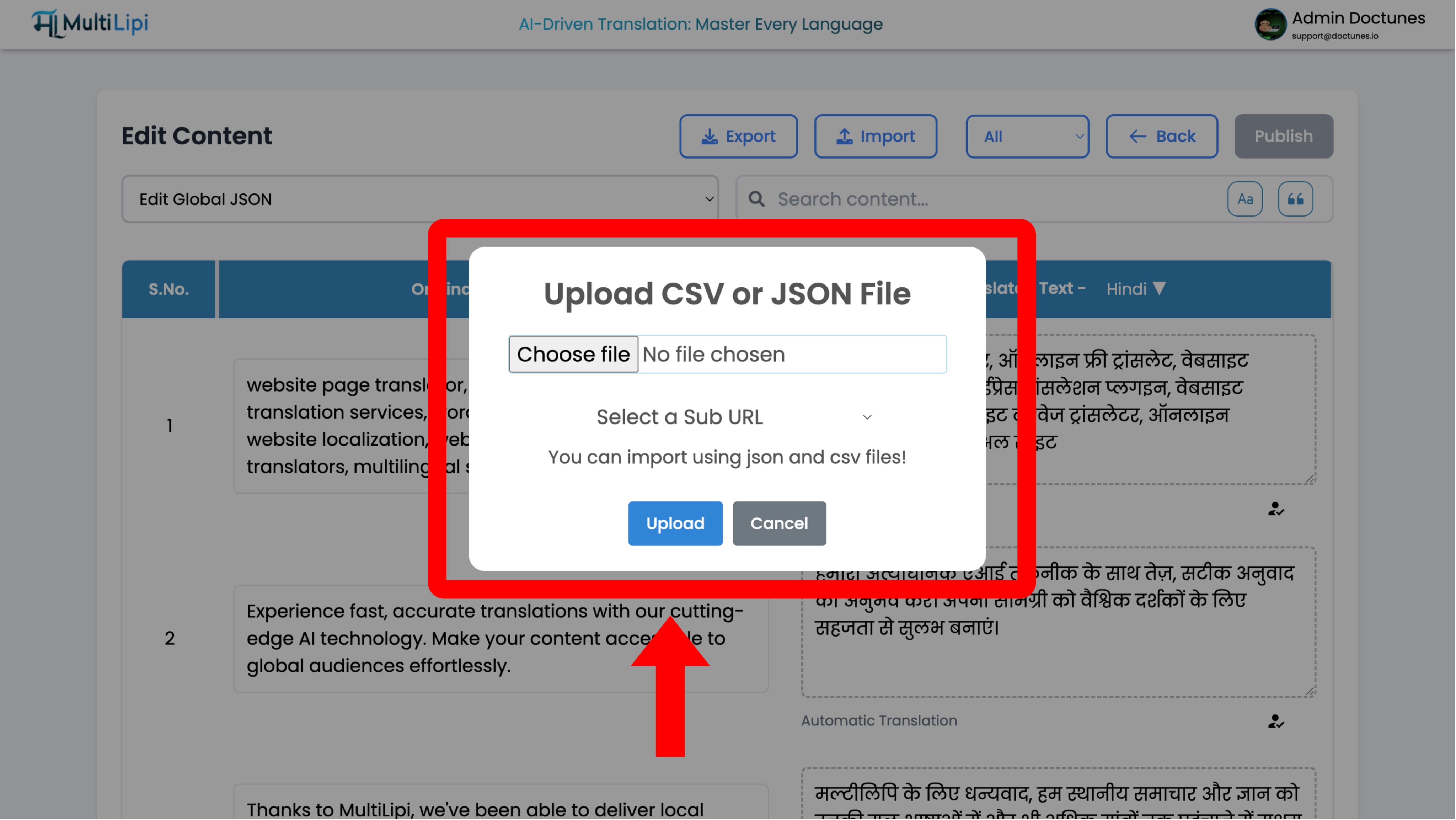
एक कॉन्फ़िगरेशन मोडल दिखाई देगा:
फ़ाइल चयन
अपना अपलोड करें .csv या .json फ़ाइल।
स्कोप परिभाषा
- •वैश्विक: इन अनुवादों को पूरे डोमेन पर लागू करें।
- •दायरा: इन अनुवादों को केवल एक विशिष्ट पृष्ठ पर लागू करने के लिए "सब यूआरएल" ड्रॉपडाउन का उपयोग करें (उदाहरण के लिए,
/मूल्य).
निष्पादित करें
क्लिक करें अपलोड करें.
System Action
सिस्टम फ़ाइल को पार्स करता है और तुरंत अनुवाद मेमोरी को अपडेट करता है। लाइव परिवर्तन तुरंत एज नेटवर्क में फैल जाते हैं।
डेटा निकालना (निर्यात प्रोटोकॉल)
इसके लिए सर्वश्रेष्ठ: ऑफ़लाइन ऑडिट, पेशेवर मानव समीक्षा, और अनुपालन बैकअप।
आप अपने डेटा के मालिक हैं। आप अपनी पूरी अनुवाद मेमोरी को कभी भी डाउनलोड कर सकते हैं।
1. संपादक तक पहुंचें
ऊपर दिए गए उसी भाषा संपादक पर जाएँ।
2. निष्कर्षण निष्पादित करें
पर क्लिक करें निर्यात आइकन (आयात के बगल में)।
3. प्रारूप चयन
चुनें
.csv(स्प्रेडशीट/एक्सेल के लिए) या.json(डेवलपर्स के लिए)।4. परिणाम
सिस्टम हर सोर्स स्ट्रिंग और उसके वर्तमान अनुवाद वाली एक स्ट्रक्चर्ड फ़ाइल जेनरेट करता है।
रणनीतिक उपयोग के मामले
| संचालन | परिदृश्य |
|---|---|
| ऑफ़लाइन ऑडिट | अपनी "कानूनी शर्तें" के पेज को CSV में एक्सपोर्ट करें और लाल रेखांकन के लिए Excel में अपने कानूनी विभाग को भेजें। स्वीकृत फ़ाइल को वापस इंपोर्ट करें। |
| पेशेवर समीक्षा | ऑटो-ट्रांसलेटेड सामग्री निर्यात करें, इसे एक प्रमाणित मानव अनुवादक को भेजें, और उनके सुधारों को बल्क में इन्जेस्ट करें। |
| बैकअप रणनीति | अपने अनुवाद संपत्तियों का स्थानीय "कोल्ड स्टोरेज" बैकअप बनाए रखने के लिए साप्ताहिक निर्यात करें। |