

नियमित क्रेडेंशियल रोटेशन के साथ अपने इंफ्रास्ट्रक्चर एक्सेस को सुरक्षित करें।
आपके मल्टीलिपि कमांड सेंटर की सुरक्षा महत्वपूर्ण है। चाहे कॉर्पोरेट अनुपालन नीतियों का पालन करना हो या बस अपनी सुरक्षा को ताज़ा करना हो, आप सहायता हस्तक्षेप की आवश्यकता के बिना सीधे डैशबोर्ड से अपने एक्सेस क्रेडेंशियल्स को घुमा सकते हैं।
यह गाइड आपके प्राथमिक खाता पासवर्ड को अपडेट करने के प्रोटोकॉल का विवरण देती है।
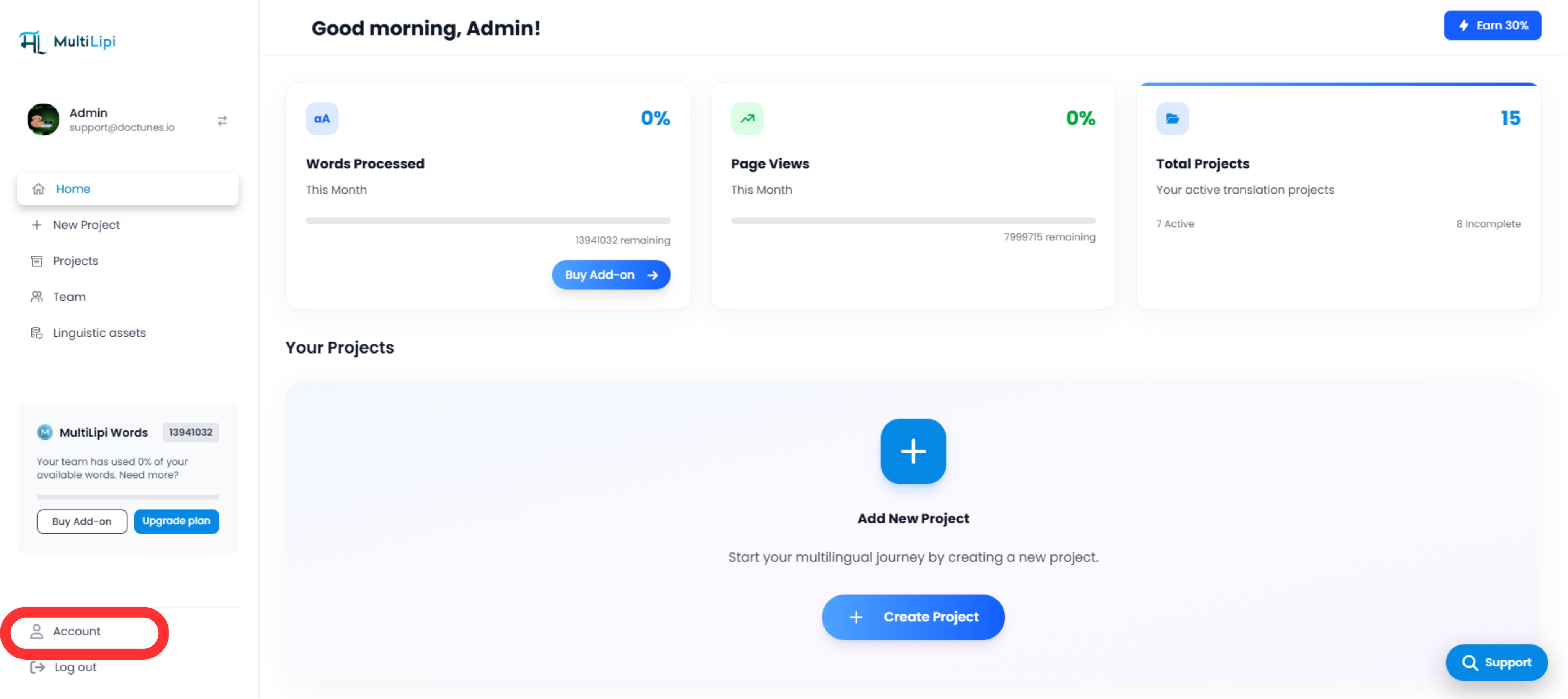
1. सुरक्षा नियंत्रणों तक पहुँचना
क्रेडेंशियल अपडेट शुरू करने के लिए:
2. अपडेट निष्पादित करना
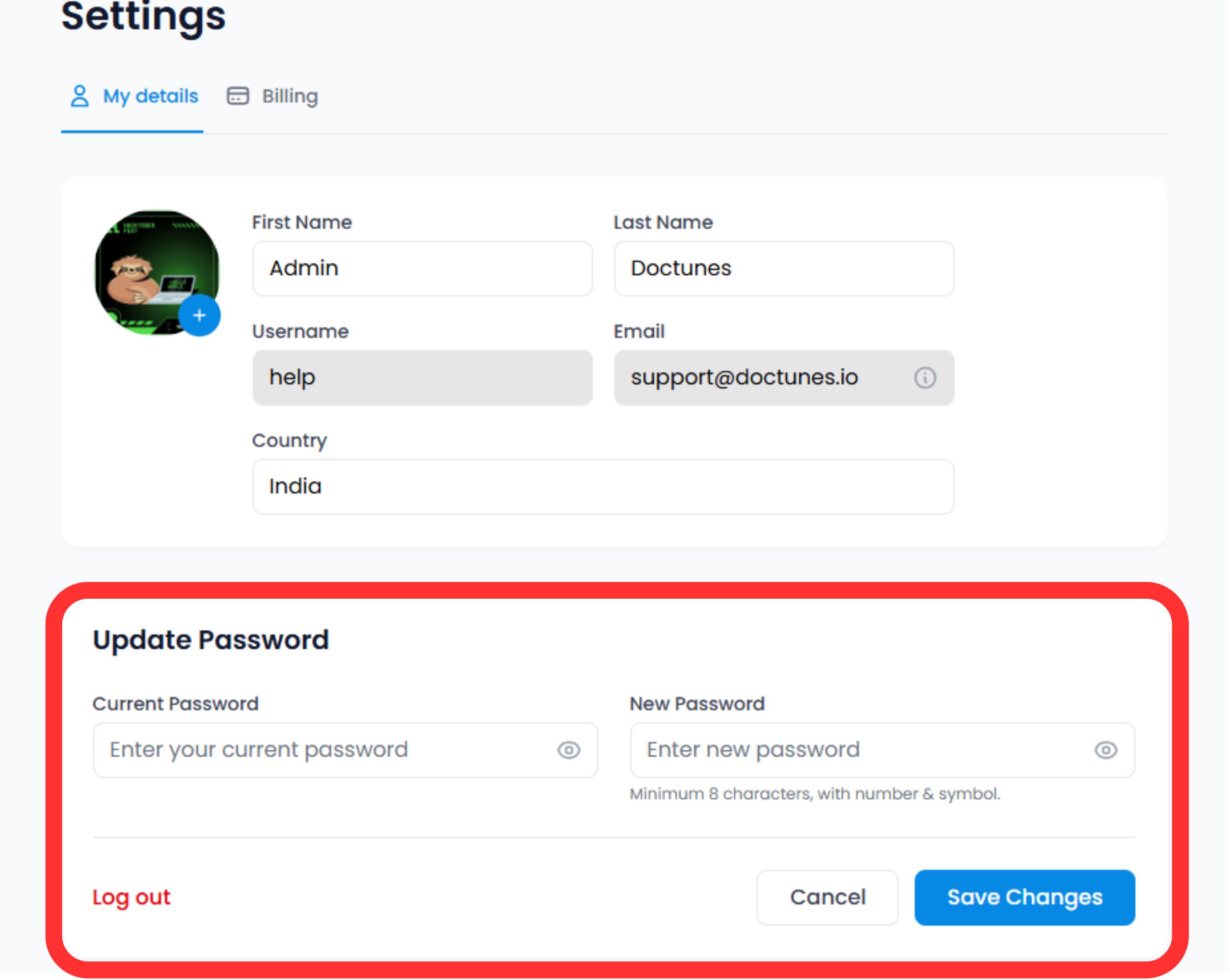
नीचे स्क्रॉल करें सुरक्षा अनुभाग प्रोफ़ाइल फ़ॉर्म के नीचे।
पहचान सत्यापित करें
अपना दर्ज करें वर्तमान पासवर्ड परिवर्तन को अधिकृत करने के लिए।
⚠️ सुरक्षा सूचना: आप अपने वर्तमान एक्सेस स्तर को साबित किए बिना अपना पासवर्ड नहीं बदल सकते।
नया क्रेडेंशियल सेट करें
अपना दर्ज करें नया पासवर्ड.
सबमिट करें
क्लिक करें परिवर्तन सहेजें.
System Action
अपडेट तत्काल है। आपको अन्य डिवाइसों पर फिर से प्रमाणित करने की आवश्यकता हो सकती है जहाँ आपका सत्र सक्रिय है।
3. क्रेडेंशियल मानक (सर्वोत्तम अभ्यास)
अधिकतम सुरक्षा के लिए, हम निम्नलिखित जटिलता नियमों का पालन करने की सलाह देते हैं:
लंबाई
न्यूनतम 12 अक्षर.
जटिलता
अल्फ़ान्यूमेरिक (A-Z, 0-9) और विशेष प्रतीकों (!@#$) का मिश्रण।
विशिष्टता
अन्य सेवाओं से पासवर्ड का पुनः उपयोग न करें।
4. रिकवरी प्रोटोकॉल
लॉग आउट?
यदि आप उपरोक्त अपडेट चरणों को करने के लिए अपना वर्तमान पासवर्ड याद नहीं रख सकते हैं, इस फ़ॉर्म का उपयोग न करें.
कार्रवाई:
लॉग आउट करें और लॉगिन स्क्रीन पर "पासवर्ड भूल गए" लिंक का उपयोग करें। यह बाहरी रूप से आपकी पहचान सत्यापित करने के लिए ईमेल-आधारित रिकवरी फ्लो को ट्रिगर करता है।
🔒 सुरक्षा सर्वोत्तम अभ्यास
हम अनुशंसा करते हैं कि आप हर 90 दिनों में अपना पासवर्ड बदलें और सुरक्षा की एक अतिरिक्त परत के लिए दो-कारक प्रमाणीकरण (2FA) सक्षम करें। नियमित क्रेडेंशियल अपडेट आपकी MultiLipi संरचना को अनधिकृत पहुँच से बचाने में मदद करते हैं।
2FA सेटअप के बारे में जानें