
1. ऑडिटिंग प्रोटोकॉल
चरण 1: प्रोजेक्ट संदर्भ तक पहुँचें
अपने मल्टीलिपी डैशबोर्ड में लॉग इन करें।
बाएं साइडबार में, under अनुवाद अनुभाग, अपनी विशिष्ट सेटिंग्स खोलने के लिए अपनी वर्तमान परियोजना पर क्लिक करें।
चरण 2: रूटिंग मैप तक पहुँचें
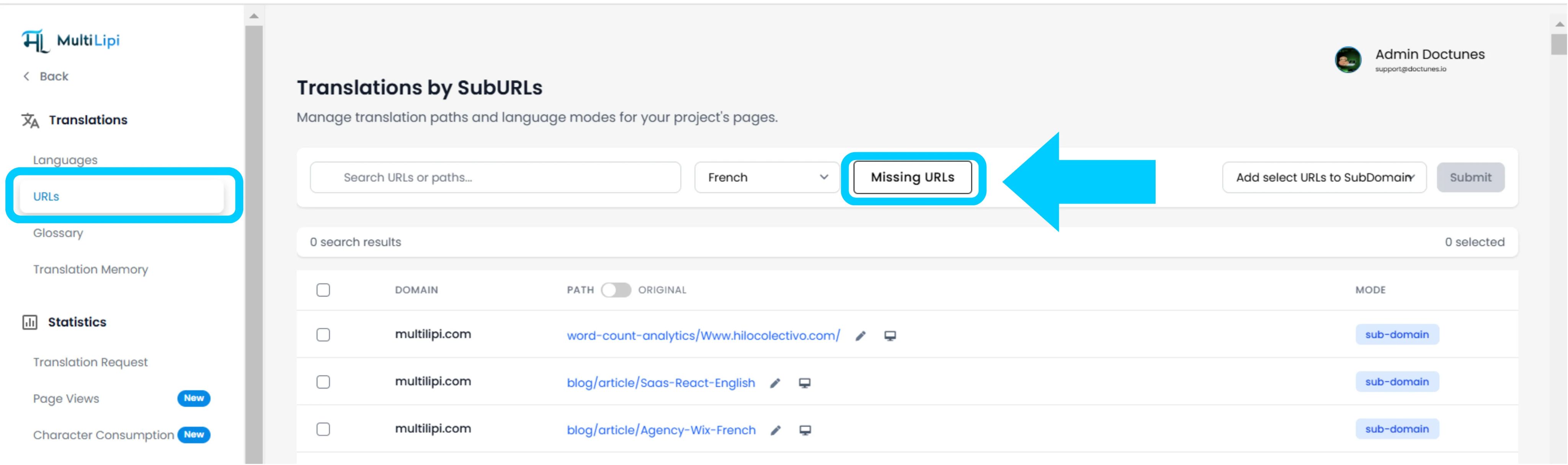
प्रोजेक्ट व्यू में, क्लिक करें यूआरएल साइडबार में विकल्प।
संदर्भ: यह पैनल वर्तमान में ट्रैक किए गए और अनुवादित सभी पाथ्स की रजिस्ट्री प्रदर्शित करता है।
चरण 3: लक्ष्य संदर्भ परिभाषित करें
सर्च बार के बगल में ड्रॉपडाउन मेनू का पता लगाएं।
कार्रवाई: उस विशिष्ट भाषा का चयन करें जिसका आप ऑडिट करना चाहते हैं (उदाहरण के लिए, फ्रेंच)।
तर्क: सिस्टम अब स्रोत (अंग्रेज़ी) इंडेक्स की तुलना फ्रेंच इंडेक्स से करेगा।
स्टेप 4: स्कैन निष्पादित करें
पर क्लिक करें लापता यूआरएल बटन।
सिस्टम क्रिया: इंजन आपके सोर्स डोमेन को वर्तमान भाषा मैप से अनुपस्थित वैध पाथ्स के लिए स्कैन करता है।
2. अंतर्ग्रहण और तुल्यकालन
ऑडिट सारांश
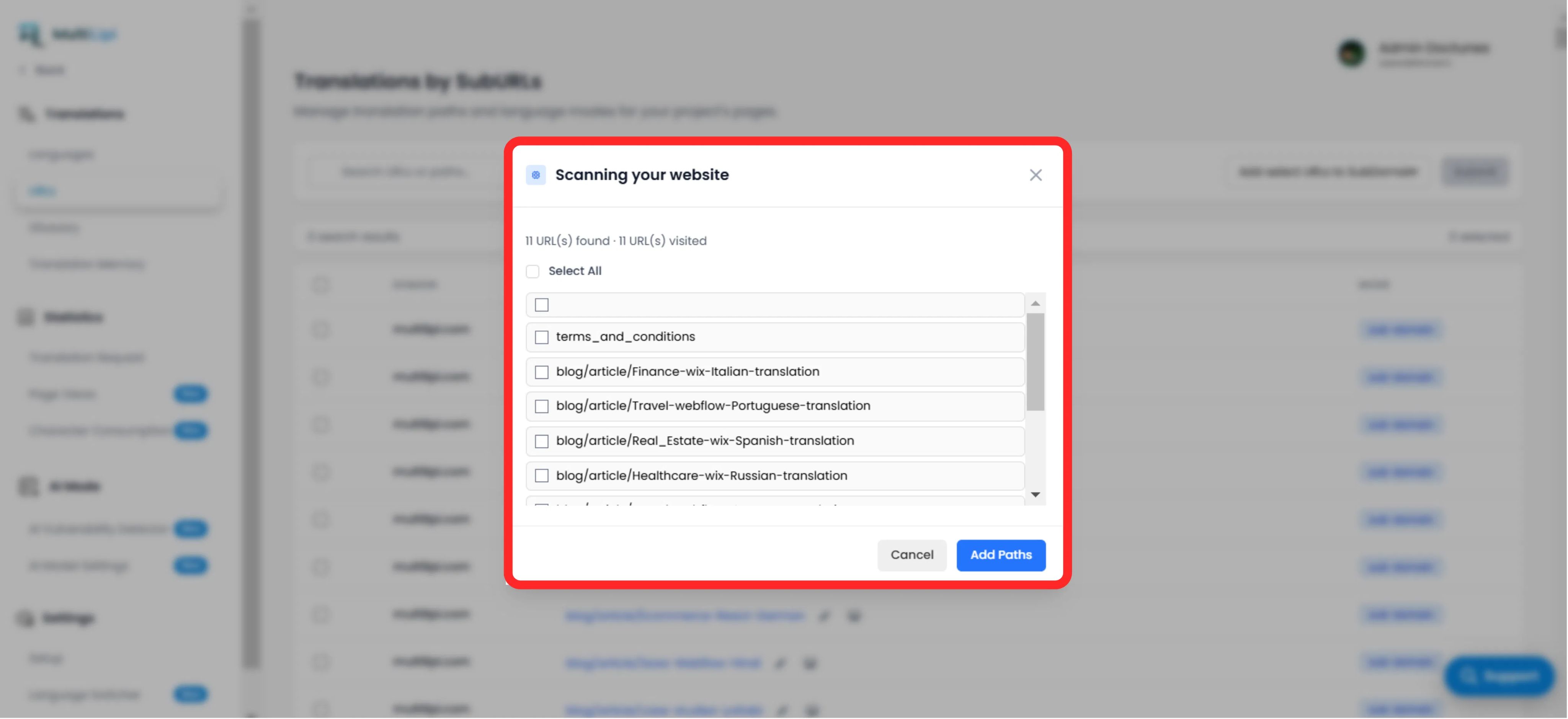
पाए गए अनट्रांसलेटेड पाथ्स की कुल संख्या प्रदर्शित करता है।
पाथ लिस्ट
हर विशिष्ट URL की एक विस्तृत सूची (उदाहरण के लिए, /blog/new-feature) जो टारगेट भाषा में मिसिंग है।
फिक्स प्रोटोकॉल
चयन: विशिष्ट पेजों के लिए मैन्युअल रूप से बॉक्स चेक करें, या पूरे बैच को सिंक्रोनाइज़ करने के लिए "सभी का चयन करें" पर क्लिक करें।
commit: "पथ जोड़ें" बटन पर क्लिक करें।
परिणाम: ये यूआरएल तुरंत ट्रांसलेशन कतार में जोड़ दिए जाते हैं। सिस्टम अब स्थानीयकृत संस्करण उत्पन्न करेगा और ट्रैफ़िक को उन तक पहुंचने देगा।
3. रणनीतिक लाभ
SEO कवरेज
सर्च इंजन उन पेजों को इंडेक्स नहीं कर सकते जो मौजूद नहीं हैं। इन यूआरएल को जोड़ने से यह सुनिश्चित होता है कि Google आपके पूरे साइट को फ्रेंच में इंडेक्स करे, न कि सिर्फ होमपेज को।
डेड एंड प्रिवेंशन
यह सुनिश्चित करता है कि यदि कोई उपयोगकर्ता डीप पेज पर भाषा बदलता है, तो उसे होमपेज पर वापस नहीं फेंका जाएगा क्योंकि विशिष्ट अनुवाद गायब था।
स्वचालित खोज
ब्लॉग पोस्टों को ट्रैक करने के लिए मैन्युअल स्प्रेडशीट की आवश्यकता को समाप्त करता है जिनका अनुवाद किया गया है।
प्रो टिप
नए पाथ्स को इनजेस्ट करने के बाद, इस पर जाएँ AI मोड > भेद्यता डिटेक्टर इन नए बनाए गए पेजों पर तत्काल एसईओ हेल्थ चेक चलाने के लिए ताकि यह सुनिश्चित हो सके कि वे लॉन्च के लिए ऑप्टिमाइज़्ड हैं।