
एक वैश्विक बुनियादी ढांचे में, घर्षण रूपांतरण का दुश्मन है। यदि पेरिस का कोई उपयोगकर्ता आपकी साइट पर आता है, तो उसे फ्रेंच पर स्विच करने के लिए फ़्लैग आइकन को मैन्युअल रूप से खोजने की आवश्यकता नहीं होनी चाहिए। MultiLipi का आगंतुक भाषा पुनर्निर्देशक एक बुद्धिमान ट्रैफ़िक नियंत्रक के रूप में कार्य करता है। यह आने वाले अनुरोध का निरीक्षण करता है Accept-Language हेडर (ब्राउज़र लोकेल) और तुरंत उपयोगकर्ता को आपकी साइट के मिलान वाले स्थानीयकृत संस्करण पर रूट करता है (जैसे, fr.yoursite.com).
यह गाइड विवरण देता है कॉन्फ़िगरेशन प्रोटोकॉल इस स्वचालित रूटिंग परत को सक्षम करने के लिए
1. रूटिंग लॉजिक
पहचान कैसे काम करती है।
डिटेक्शन:
एक उपयोगकर्ता आपकी साइट.कॉम पर आता है।
निरीक्षण:
इंजन ब्राउज़र सेटिंग्स (जैसे, fr-FR) पढ़ता है।
रूटिंग:
यदि आपके प्रोजेक्ट में फ्रेंच एक सक्रिय भाषा है, तो सिस्टम तुरंत फ्रेंच सबडोमेन पर 302 अस्थायी रीडायरेक्ट करता है।
फ़ॉलबैक:
यदि उपयोगकर्ता की भाषा समर्थित नहीं है, तो वे डिफ़ॉल्ट (स्रोत) भाषा पर बने रहते हैं।
2. कॉन्फ़िगरेशन प्रोटोकॉल
इस सुविधा को सीधे अपने प्रोजेक्ट के कमांड सेंटर से सक्षम करें।
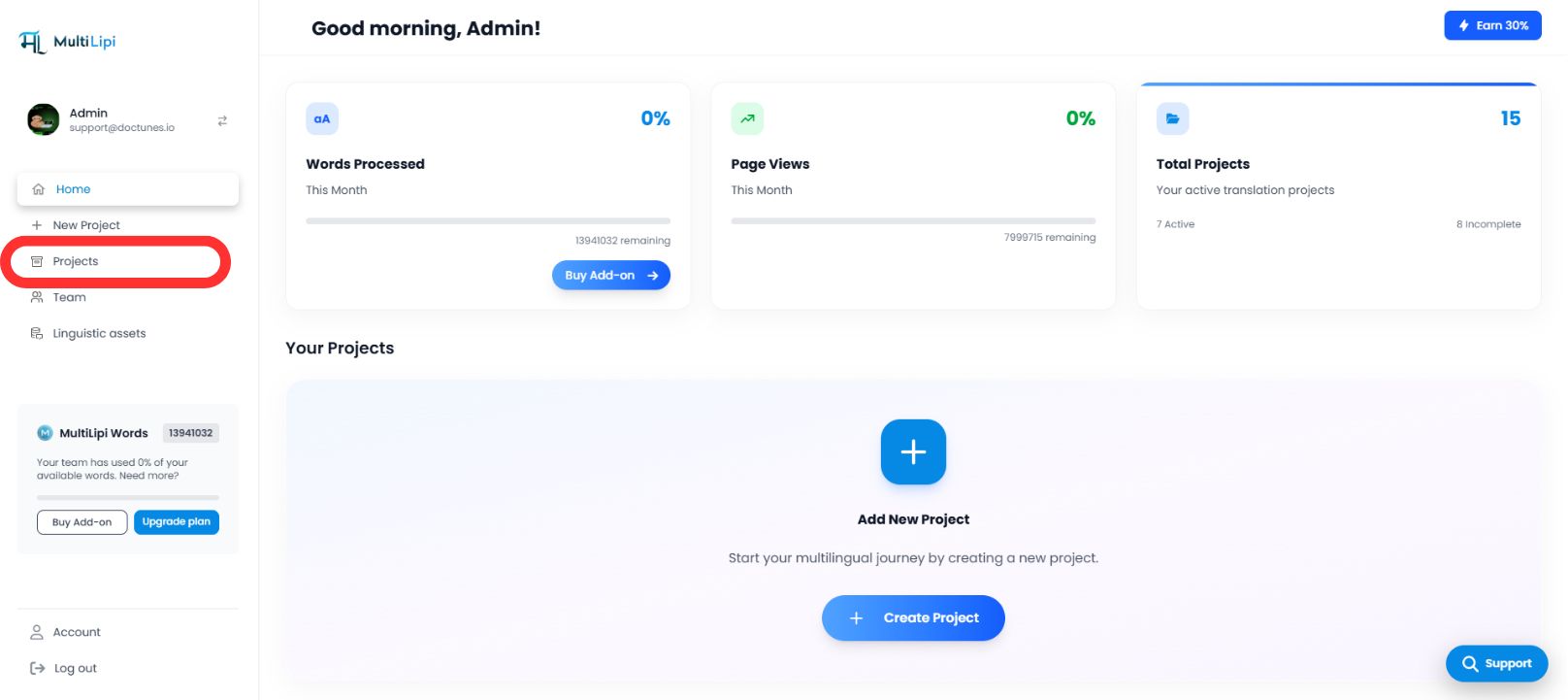
चरण 1: प्रोजेक्ट डैशबोर्ड एक्सेस करें
- •अपने MultiLipi डैशबोर्ड में लॉग इन करें।
- •बाएं हाथ के साइडबार पर नेविगेट करें और इस पर क्लिक करें प्रोजेक्ट्स अपना सक्रिय पोर्टफोलियो देखने के लिए।
चरण 2: लक्ष्य प्रोजेक्ट चुनें
- •वह विशिष्ट डोमेन पता लगाएँ जिसे आप कॉन्फ़िगर करना चाहते हैं।
- •पर क्लिक करें प्रोजेक्ट टाइल अपने विशिष्ट प्रबंधन कंसोल में प्रवेश करने के लिए।
चरण 3: सेटअप कॉन्फ़िगरेशन तक पहुँचें
- •प्रोजेक्ट व्यू के बाईं ओर साइडबार में, इस पर क्लिक करें सेटिंग्स.
- •ड्रॉपडाउन या सब-मेनू से, चुनें प्रोजेक्ट सेटिंग्स.

चरण 4: रूटिंग सक्रिय करें
- •सेटअप पैनल को तब तक नीचे स्क्रॉल करें जब तक आपको यह न मिल जाए "आगंतुक भाषा पुनर्निर्देशक" विकल्प।
- •कार्रवाई: स्विच को टॉगल करें
चालू. - •सिस्टम प्रतिक्रिया: रूटिंग इंजन अब सक्रिय है। नए आगंतुकों को उनके ब्राउज़र वरीयता के आधार पर स्वचालित रूप से पुनर्निर्देशित किया जाएगा।
कॉन्फ़िगरेशन पूर्ण – रूटिंग इंजन सक्रिय
3. रणनीतिक लाभ
इस प्रक्रिया को स्वचालित क्यों करें?
बाउंस रेट में कमी:
आगंतुक तुरंत छोड़ने की संभावना कम यदि वे पहले सेकंड के भीतर अपनी मूल भाषा में सामग्री देखते हैं।
रूपांतरण वेग:
हटाना "मैनुअल स्विच" कदम लैंडिंग से चेकआउट तक उपयोगकर्ता की यात्रा को तेज करता है।
स्मार्ट फ़ॉलबैक:
सिस्टम है गैर-दखलंदाजी; यह केवल तभी रीडायरेक्ट करता है जब एक मिलान अनुवाद मौजूद हो, यह सुनिश्चित करता है कि कोई भी उपयोगकर्ता कभी भी डेड एंड पर न पहुंचे।
अपनी मुफ़्त माइग्रेशन शुरू करें
स्वचालित भाषा पुनर्निर्देशन आपकी साइट को एक निष्क्रिय अनुवाद पोर्टल में एक बुद्धिमान स्थानीयकरण इंजन जो उपयोगकर्ता के क्लिक करने से पहले ही उनकी ज़रूरतों का अनुमान लगाता है।